Screen Resolutions Explained: 720p to 8K Guide
The complete guide to screen resolutions, aspect ratios, and pixel density. Know exactly what 1080p, 1440p, 4K, and 8K mean and which one you actually need.
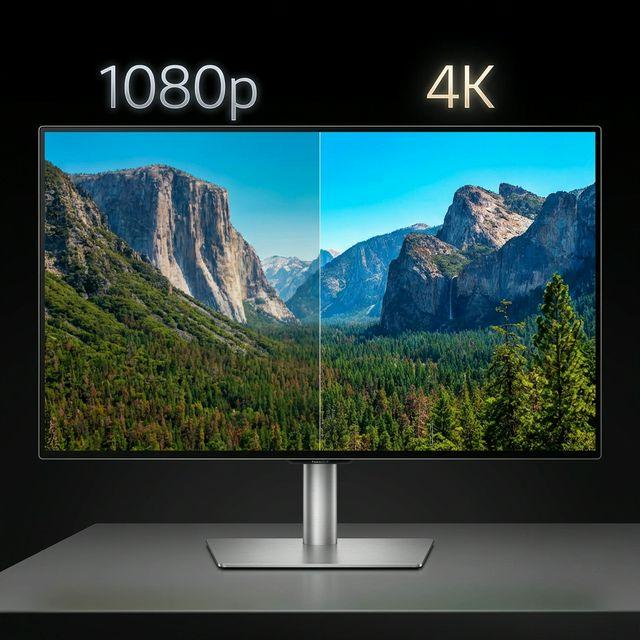
What Do All These Numbers Mean?
720p, 1080p, 1440p, 4K, 8K - screen resolutions are everywhere, from phone specs to streaming settings to monitor shopping. But what do they actually mean, and when does it matter?
Resolution Basics
What Is Resolution?
Resolution is the number of pixels (tiny colored dots) that make up your display. More pixels = sharper image.
It's expressed as width x height: 1920x1080 means 1,920 pixels across and 1,080 pixels tall. That's over 2 million individual pixels.
What Does the "p" Mean?
The "p" stands for progressive scan (as opposed to "i" for interlaced). In modern usage, it simply refers to the vertical pixel count:
- 720p = 720 pixels tall
- 1080p = 1,080 pixels tall
- 1440p = 1,440 pixels tall
- Old TV standard (pre-2005)
- DVD quality
- Still used for some streaming on slow connections
- Looks noticeably blurry on modern screens
- Entry-level HD
- Still fine for smaller screens (under 32 inches)
- Some budget streaming default
- Good for video calls
- The mainstream standard
- Called "Full HD" or "FHD"
- Most common monitor resolution
- Standard for streaming, gaming, and content
- Looks great up to about 27 inches
- Called "2K" or "QHD" or "WQHD"
- The sweet spot for PC gaming
- Noticeably sharper than 1080p
- Great for 27-32 inch monitors
- Good balance of quality and performance
- Four times the pixels of 1080p
- Standard for modern TVs
- Growing in monitors and streaming
- Ideal for 32-inch and larger screens
- Requires more powerful hardware for gaming
- Apple Studio Display, LG UltraFine
- Professional creative work
- Niche market
- 16 times the pixels of 1080p
- Very few content sources exist
- Extremely expensive displays
- Barely distinguishable from 4K at normal viewing distances
Why "4K" Breaks the Pattern
4K refers to the horizontal pixel count (approximately 4,000 pixels wide), not the vertical. Marketing decided to switch conventions because "4K" sounds more impressive than "2160p."
Every Resolution Explained
SD (Standard Definition)
480p - 640x480 (0.3 megapixels)
HD (High Definition)
720p - 1280x720 (0.9 megapixels)
1080p - 1920x1080 (2.1 megapixels)
QHD (Quad HD)
1440p - 2560x1440 (3.7 megapixels)
UHD (Ultra HD)
4K - 3840x2160 (8.3 megapixels)
5K - 5120x2880 (14.7 megapixels)
8K - 7680x4320 (33.2 megapixels)
The Complete Resolution Cheat Sheet
| Name | Resolution | Pixels | Common Use |
| 480p (SD) | 640x480 | 307K | Legacy |
| 720p (HD) | 1280x720 | 922K | Budget streaming |
| 1080p (FHD) | 1920x1080 | 2.1M | Most common |
| 1440p (QHD) | 2560x1440 | 3.7M | PC gaming sweet spot |
| 4K (UHD) | 3840x2160 | 8.3M | Modern TVs |
| 5K | 5120x2880 | 14.7M | Pro creative |
| 8K | 7680x4320 | 33.2M | Cutting edge |
| Screen Size | Ideal Resolution | PPI | |
| 24 inch | 1080p | 92 | |
| 27 inch | 1440p | 109 | |
| 32 inch | 4K | 138 | |
| 43 inch TV | 4K | 102 | |
| 55 inch TV | 4K | 80 | |
| 65 inch TV | 4K | 68 | |
| Resolution | GPU Needed | Frame Rate | Verdict |
| 1080p | Mid-range | 144+ fps easy | Budget choice |
| 1440p | Upper mid | 100+ fps | Best value |
| 4K | High-end | 60-120 fps | Premium |
| 8K | Not practical | <60 fps | Don't bother |
| Resolution | 1 Min (H.264) | 1 Hour | |
| 720p | ~50 MB | ~3 GB | |
| 1080p | ~130 MB | ~8 GB | |
| 1440p | ~230 MB | ~14 GB | |
| 4K | ~375 MB | ~22 GB | |
| Phone | Resolution | PPI | |
| iPhone 15 | 2556x1179 | 460 | |
| Samsung S24 | 2340x1080 | 416 | |
| iPhone 15 Pro Max | 2796x1290 | 460 | |
| Samsung S24 Ultra | 3120x1440 | 505 |
Phone screens have far higher PPI than monitors because you hold them much closer.
Convert Your Media
Use our file converter to convert images and videos between formats. Fast, free, and right in your browser.
Disclaimer
This article is for informational purposes only. Screen resolutions, specifications, and recommendations may vary by manufacturer and use case. Product specifications referenced are accurate at time of publication but may change. Always verify specifications before making purchasing decisions.

Andrew
·Founder of ConvertzBuilding free, accurate conversion tools for everyone. All content is AI-assisted and editorially reviewed for accuracy. Learn more about Convertz
Try Our Free Converters
Convert currencies, cryptocurrencies, units, and files instantly with our free online tools.
Related Articles

The End of Financial Privacy? Programmable Money and Who Controls Your Cash
Digital money can be tracked, controlled, and frozen in ways physical cash never could. As CBDCs, stablecoins, and programmable payments replace cash, who gets to watch — and who gets to decide what you can spend? The privacy battle behind the future of money.

When Software Becomes the Customer: Inside the AI-Agent Economy
For all of history, every transaction had a human on at least one end. In 2026 that ended — AI agents now shop, negotiate, and pay on their own. Here is how the machine economy works, who is racing to build its payment rails, and what it means for you.

Gold Just Beat US Treasuries — The Hard-Asset Side of the New Money System
For the first time since 1996, the gold held by foreign central banks is worth more than their US Treasury holdings. As money goes digital, the world is quietly re-anchoring to hard assets — gold, silver, copper, uranium. Here is the resource story behind the financial revolution.
Related across Convertz
Country guides, key terms, and rate history that connect to this article.
Glossary
- Mid-Market RateThe mid-market rate is the midpoint between the buy (bid) and sell (ask) price of a curren…
- Spot RateThe spot rate is the current market exchange rate at which a currency pair trades for imme…
- ECB Refinancing RateThe ECB Main Refinancing Operations (MRO) rate is the European Central Bank's primary poli…